Are you struggling to create eye-catching marketing videos that stand out but feel limited by your budget, time, or resources? Maybe you want to show a scene that’s difficult or expensive to film, like a person standing on a mountain peak, but you’re stuck in a flat city. Or perhaps you want to create a fantasy scene that would normally require a big special-effects team.
If this sounds familiar, you’re not alone. Artificial intelligence (AI) is opening new doors for marketers and creators who want to produce engaging videos faster and more affordably.
DW Creative helps home service businesses grow by building strong connections between their brands and the homeowners they serve.
By reading this article, you will learn why AI is useful for making marketing videos, what it can do well, its current limitations, and how you still need human input to get great results.
You can also watch a video summary of this article below.
Why Use AI to Make Marketing Videos?
One of the biggest advantages of AI is its ability to create “dream shots,” scenes that are either impossible or extremely difficult to film in real life.
Imagine you’re a videographer in Florida, but your client wants a shot of someone standing on a mountain. Traveling to the mountain, arranging the shoot, and capturing the perfect scene could take days or weeks and cost thousands. With AI video tools, you can generate that mountain shot quickly and at a fraction of the cost.
AI can also produce fantasy or supernatural effects that otherwise require expensive special effects, like glowing magic, otherworldly creatures, or surreal environments. These would usually need large crews and heavy editing, but AI can create them in moments based on your instructions.
Top 3 AI Video Generation Tools in 2025
As of mid-2025, the leading AI video generation platforms are:
1. Google Veo 3
Developed by DeepMind, Veo 3 is a state-of-the-art AI video generation system capable of producing high-resolution videos (up to 4K) from text, image, or video prompts. It excels in creating cinematic scenes with synchronized audio, including dialogue, sound effects, and ambient noise. Notably, Veo 3 offers robust character consistency and realistic physics, making it ideal for marketers and creators aiming for high-quality, immersive content.
2. Runway Gen-3
Runway’s Gen-3 platform is renowned for its cinematic output and advanced editing tools. It allows users to generate videos from text or images and provides features like motion control, keyframe management, and background removal. Runway is particularly favored by professionals in the film and media industries for its versatility and integration capabilities.
3. Synthesia
Synthesia specializes in creating AI-generated videos featuring lifelike avatars that can speak your script. It’s widely used for corporate training, internal communications, and marketing videos. With a user-friendly interface and support for multiple languages, Synthesia enables rapid video production without the need for actors or cameras.
These platforms represent the forefront of AI-driven video creation, each offering unique features tailored to different needs and use cases.
What Are Some Downsides and Limitations of AI Video Creation?
AI video creation is exciting, but it’s not perfect — there are some important challenges to keep in mind:
Editing and Fine-Tuning Are Still Needed
AI can produce cool footage quickly, but you often need to spend time editing the clips to make sure they flow well together and tell a clear story. The AI might generate some odd details that need correction or tweaking.
Most programs also limit how many videos you can generate at a time. Google Veo 3, for example, charges “credits” for video generation.
Difficulty With Recurring Characters
If your video features the same person multiple times, AI sometimes struggles to keep the character’s face and look consistent. For example, you might upload a photo of a person, but the AI may generate a slightly different face each time you create a new clip.
Certain Shots Are Hard for AI
AI currently struggles to create “falling” or fast-motion shots that involve complex physics. It may also refuse to generate violent or inappropriate scenes due to ethical filters built into the AI.
Audio and Voiceover Can Be Hit or Miss
AI-generated audio, like voiceovers, sometimes sounds robotic or doesn’t match the visuals perfectly. You may need to try different AI voices or tweak the audio separately for better quality. Matching a voice to a character’s face isn’t always smooth yet.
AI Video Still Needs Human Creativity and Management
You might wonder: If AI can generate videos, do humans still need to be involved? Absolutely.
AI is a tool, not a replacement for human creativity. People come up with the video ideas, write the scripts or prompts, and guide the AI on what to generate. After the AI produces clips, humans must edit and arrange the footage, adjust audio, and ensure everything fits the brand message and story.
Without this human input, the final video can feel disjointed or unnatural. Good marketing videos need storytelling, clear goals, and emotional impact, all things that AI alone can’t fully deliver yet.
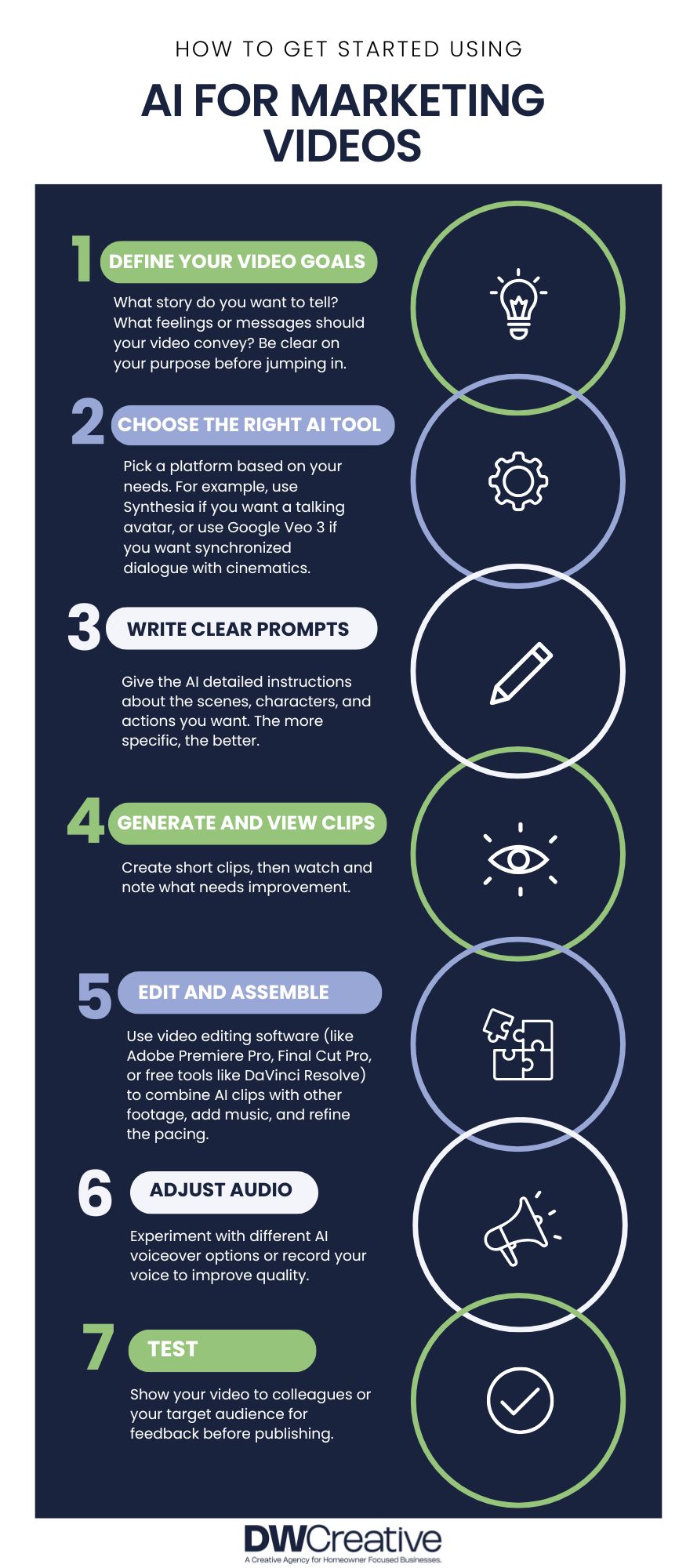
How to Get Started Using AI for Marketing Videos
Here are some steps you can take if you want to try AI video tools for your next marketing project:
1. Define Your Video Goals
What story do you want to tell? What feelings or messages should your video convey? Be clear on your purpose before jumping in.
2. Choose the Right AI Tool
Pick a platform based on your needs. For example, use Synthesia if you want a talking avatar.
3. Write Clear Prompts and Scripts
Give the AI detailed instructions about the scenes, characters, and actions you want. The more specific, the better.
4. Generate and Review Clips
Create short clips, then watch and note what needs improvement.
5. Edit and Assemble
Use video editing software (like Adobe Premiere Pro, Final Cut Pro, or free tools like DaVinci Resolve) to combine AI clips with other footage, add music, and refine the pacing.
6. Adjust Audio
Experiment with different AI voiceover options or record your voice to improve quality.
7. Test and Get Feedback
Show your video to colleagues or your target audience for feedback before publishing.
The Future of AI in Marketing Videos
AI technology is improving rapidly. Soon, we’ll likely see better character consistency, more natural voices, and more complex scene creation. For now, AI is best used as a creative assistant — speeding up parts of the process and making certain shots possible that were out of reach before.
By combining human creativity with AI tools, marketers can produce videos that are more imaginative, cost-effective, and personalized.
Next Steps for Using AI for Marketing Videos
AI is changing the way marketers create videos, unlocking new creative possibilities and saving time on complex shots. You can use AI to make fantasy scenes, dream shots, or quick marketing clips without a huge budget or crew. However, AI still has limits with recurring characters, certain types of shots, and audio quality. It also requires human creativity and editing to produce polished, effective videos.
If you want to start using AI for marketing videos, define your goals, pick a tool that fits your needs, write clear prompts, and be ready to spend time editing and refining the results. With the right approach, AI can be a powerful ally in telling your brand’s story.
DW Creative is an agency committed to empowering homeowner-focused businesses. If you want help creating a marketing strategy or brand designs, schedule a fit call with our team to see how DW Creative can help.
If you’re not ready to make a commitment or want to learn more about marketing strategy and digital marketing, we recommend the following articles: